
GPU
Deploy ROSA + Nvidia GPU + RHOAI with Automation
Getting Red Hat OpenShift AI up and running with NVIDIA GPUs on a Red Hat OpenShift Service on AWS (ROSA) cluster can involve a series of detailed steps, from installing various operators to managing dependencies. While manageable, this process can be time-consuming when you’re eager to start leveraging OpenShift AI for your projects.
This guide and its accompanying Git repository are designed to streamline your setup significantly. We focus on getting you productive faster by using Terraform to deploy a ROSA cluster with GPUs from the start. From there, Ansible scripts take over, automating the deployment and configuration of all necessary operators for both NVIDIA GPUs and Red Hat OpenShift AI. This means less manual configuration for you and more time spent on what matters: innovating with AI.
Deploying and Running Ollama and Open WebUI in a ROSA Cluster with GPUs
Red Hat OpenShift Service on AWS (ROSA) provides a managed OpenShift environment that can leverage AWS GPU instances. This guide will walk you through deploying Ollama and OpenWebUI on ROSA using instances with GPU for inferences.
Prerequisites
- A Red Hat OpenShift on AWS (ROSA classic or HCP) 4.14+ cluster
- OC CLI (Admin access to cluster)
- ROSA CLI
Set up GPU-enabled Machine Pool
First we need to check availability of our instance type used here (g4dn.xlarge), it should be in same region of the cluster. Note you can use also Graviton based instance (ARM64) like g5g* but only on HCP 4.16+ cluster.
Creating Images using Stable Diffusion on Red Hat OpenShift AI on ROSA cluster with GPU enabled
1. Introduction
Stable Diffusion is an AI model to generate images from text description. It uses a diffusion process to iteratively denoise random Gaussian noise into coherent images. This is a simple tutorial to create images using Stable Diffusion model using Red Hat OpenShift AI (RHOAI) , formerly called Red Hat OpenShift Data Science (RHODS), which is our OpenShift platform for AI/ML projects lifecycle management, running on a Red Hat OpenShift Services on AWS (ROSA) cluster, which is our managed service OpenShift platform on AWS, with NVIDIA GPU enabled.
ROSA with Nvidia GPU Workloads
ROSA guide to running Nvidia GPU workloads.
Prerequisites
- ROSA Cluster (4.14+)
- rosa cli #logged-in
- oc cli #logged-in-cluster-admin
- jq
If you need to install a ROSA cluster, please read our ROSA Quickstart Guide , or better yet Use Terraform to create an HCP Cluster .
Enter the oc login command, username, and password from the output of the previous command:
Example login:
Linux:
ROSA with Nvidia GPU Workloads - Manual
This is a guide to install GPU on ROSA cluster manually, which is an alternative to our Helm chart guide .
Prerequisites
- ROSA cluster (4.14+)
- rosa cli
- oc cli
1. Setting up GPU machine pools
In this tutorial, I’m using g5.4xlarge node for the GPU machine pools with auto-scaling enabled up to 4 nodes. Please replace your-cluster-name with the name of your cluster.
How to deploy Jupyter Notebook
Retrieve the login command
If you are not logged in via the CLI, access your cluster via the web console, then click on the dropdown arrow next to your name in the top-right and select Copy Login Command.
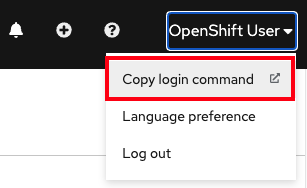
A new tab will open and select the authentication method you are using (in our case it’s github)
Click Display Token
Copy the command under where it says “Log in with this token”. Then go to your terminal and paste that command and press enter. You will see a similar confirmation message if you successfully logged in.
Installing the Open Data Hub Operator
The Open Data Hub operator is available for deployment in the OpenShift OperatorHub as a Community Operators. You can install it from the OpenShift web console:
-
From the OpenShift web console, log in as a user with cluster-admin privileges. For a developer installation from try.openshift.com including AWS and CRC, the kubeadmin user will work.
-
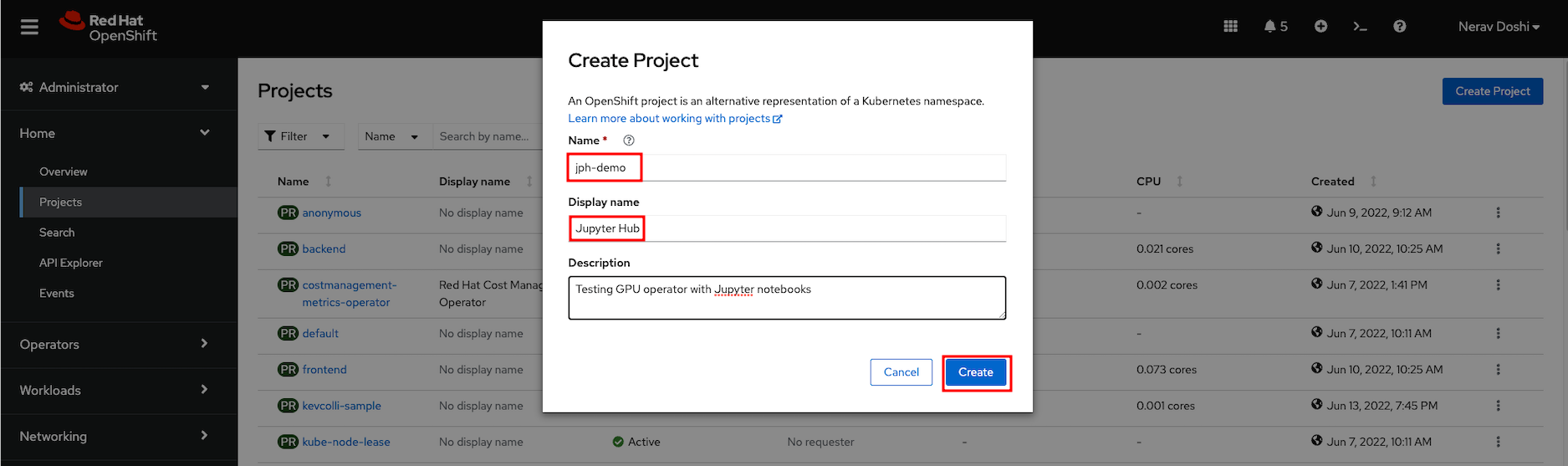
Create a new project named ‘jph-demo’ for your installation of Open Data Hub
-
Find Open Data Hub in the OperatorHub catalog.
Jupyter Notebooks
You will need the following prerequistes in order to run a basic Jupyter notebook with GPU on OpenShift
1. A OpenShift Cluster
This will assume you have already provisioned a OpenShift cluster succesfully and are able to use it.
You will need to log in as cluster admin to deploy GPU Operator .
2. OpenShift Command Line Interface
Please see the OpenShift Command Line section for more information on installing.
The following guides through a step by step procedure in deploying Jupyter Notebook in OpenShift.
ARO with Nvidia GPU Workloads
ARO guide to running Nvidia GPU workloads.
Prerequisites
- oc cli
- Helm
- jq, moreutils, and gettext package
- An ARO 4.14 cluster
Note: If you need to install an ARO cluster, please read our ARO Terraform Install Guide . Please be sure if you’re installing or using an existing ARO cluster that it is 4.14.x or higher.
Note: Please ensure your ARO cluster was created with a valid pull secret (to verify make sure you can see the Operator Hub in the cluster’s console). If not, you can follow these instructions.
